The fundamental problem was the sheer volume of news in the world. Keeping up with it daily took up a lot of time, yet I still wanted to stay informed. My solution was to track the most popular news stories using Google Trends and have AI read and summarize them. Every day at noon I receive a summary of the top 10 latest stories, complete with links to the original articles should I wish to read further. This way I cut down on “mental junk food” — managing the flood of clickbait and fake news — while staying up-to-date using trending data.
What problem does it solve?
The real issue isn’t the lack of news — it’s the opposite. There’s too much of it, and most of it is noise. Traditional news consumption is passive: you open an app, get hit with whatever the algorithm pushes, and lose 30 minutes without learning much.
What if instead of chasing news, you let trending data tell you what actually matters right now — and have AI do the reading for you?
That’s the core idea. Instead of browsing manually, the workflow:
- Fetches what people are actually searching for in real time via Google Trends
- Looks up relevant news articles from trusted RSS feeds
- Summarizes everything into a clean HTML email delivered at noon
The N8N workflow
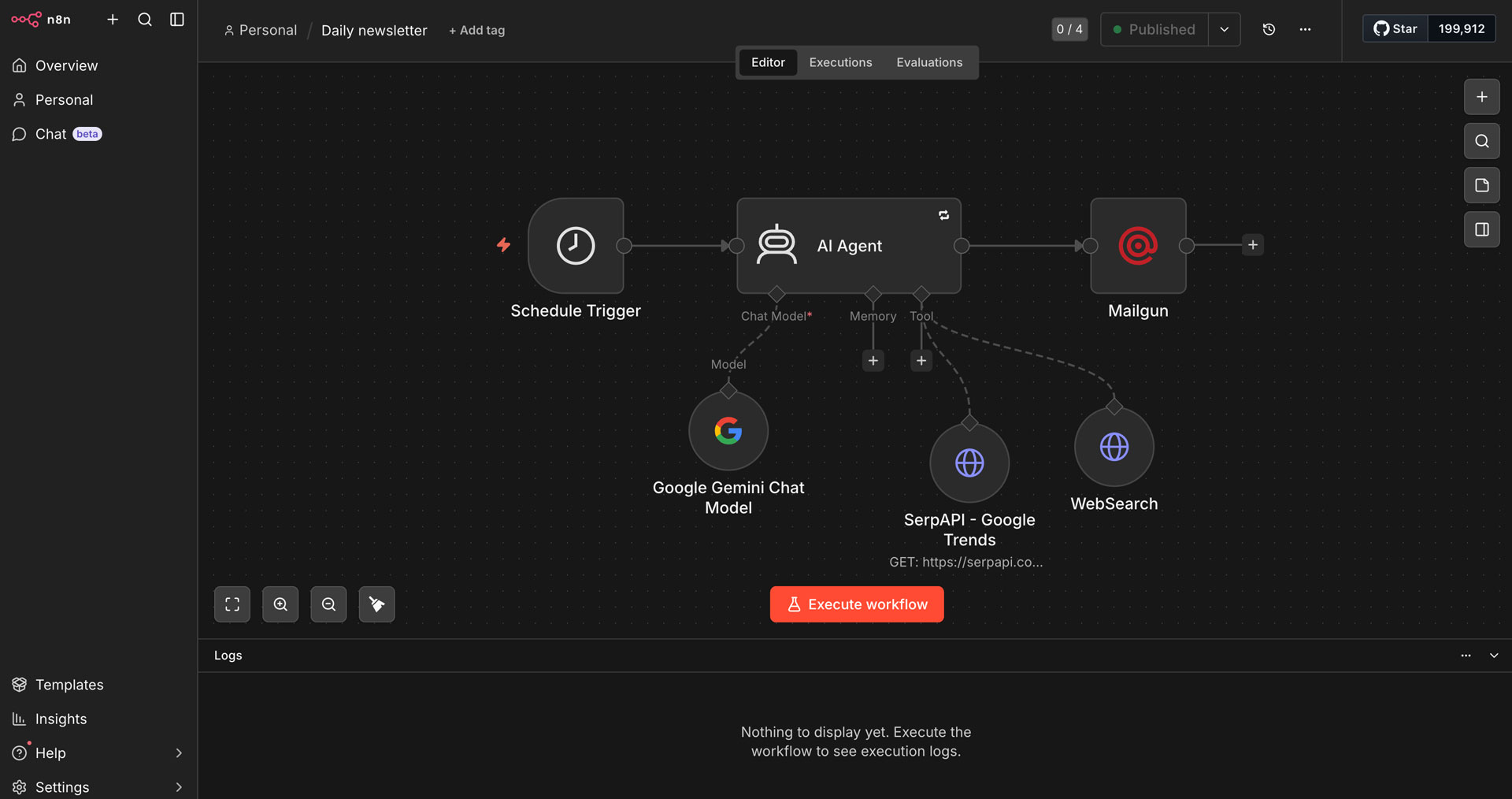
The workflow is intentionally simple — 6 nodes, one linear flow.
The big picture
Schedule Trigger (12:00) → AI Agent → Mailgun (email delivery)
The AI Agent has two tools available: one to fetch trending topics, one to read RSS feeds. Everything else is handled by the LLM.
Node breakdown
1.) Schedule Trigger
Fires once a day at noon. No manual intervention needed.
2.) Google Gemini Chat Model
Powers the AI Agent. I chose Google Gemini over OpenAI for cost reasons — for a daily personal automation, it’s more than capable.
3.) SerpAPI – Google Trends
This is the data source for what’s trending. It calls the SerpAPI google_trends_trending_now endpoint, scoped to Hungary (geo=HU). The agent calls this tool first — before doing anything else.
GET https://serpapi.com/search
  ?engine=google_trends_trending_now
  &geo=HU
  &hl=hu
  &api_key=...
4.) WebSearch (RSS Fetcher)
A simple HTTP request tool. The agent uses it to GET the content of RSS feeds from Hungarian news sources and parse the XML to find articles matching the trending topics.
5.) AI Agent
The brain of the workflow. It runs a strict 3-step sequence:
- Call
google_trendstool — get the raw list of trending topics - For each of the top 10 topics — determine category, pick the right RSS feed, fetch it, extract the matching article link
- Synthesize everything into an HTML newsletter
Trimmed system prompt (the agent’s instructions)
# Role
You are an expert Trend Topic Newsletter Editor.

# RESOURCES: RSS Feed Database
You have access to the following direct RSS feeds:
- General: https://index.hu/24ora/rss/
- General/Politics: https://hvg.hu/rss
- General/Politics: https://telex.hu/rss
- Economy: https://www.portfolio.hu/rss/all.xml
- Sports/Football: https://feeds.bbci.co.uk/sport/football/rss.xml
- IT security: https://nki.gov.hu/it-biztonsag/hirek/feed/
# (+ more sources)

# EXECUTION ORDER
1. FIRST: Call the google_trends tool — get trending topics in Hungary
2. SECOND: For each of the top 10 topics:
   - Determine category (Sport, Politics, Economy...)
   - Fetch the most relevant RSS feed URL
   - Parse the XML, find a matching <item>
   - Extract the <link>
3. THIRD: Synthesize into HTML output

# Output Structure
- <h1> header with current date
- <p><i> one-sentence hook about the day's mood
- For each topic: <h3> topic name, <ul> with summary, background context, and source link
6.) Mailgun
Sends the final HTML email to my inbox every day at noon. Subject line includes the current date via an N8N expression:
Trending topics - {{ $now.toFormat('yyyy.MM.dd') }}
Understanding prompt levels: system vs. user vs. assistant
When you interact with an LLM via an API — or configure one inside a tool like N8N — you’re actually sending a structured list of messages, each with a defined role. According to the OpenAI documentation, the most common roles are:
| Role | Who it represents | When it runs |
|---|---|---|
system | The developer / application | Once, at the start — sets the rules |
user | The human sending a message | Every turn — the actual request |
assistant | The model’s previous replies | Used in multi-turn conversations for context |
tool | The result of a function/tool call | After the agent calls an external tool |
The system prompt is fundamentally different from the others. While a user message is what you type into a chat box, the system message is the invisible layer that runs before everything else. It defines the model’s role, constraints, tone, and behaviour for the entire conversation.
Think of it this way: the
userprompt is the question, thesystemprompt is the job description that determines how the question will be answered.
In the workflow above, the system prompt is where I define the agent’s persona (“You are an expert Trend Topic Newsletter Editor”), its available data sources (the RSS feed list), the strict execution order it must follow, and the exact HTML output format it must produce. None of that would be possible to control reliably through a user message alone.
This is also why the system prompt deserves careful engineering. A well-written system prompt is the difference between an agent that behaves predictably and one that hallucinates, skips steps, or ignores your formatting rules. In my case, the MANDATORY EXECUTION ORDER section is the most critical part — without it, the agent would sometimes skip fetching RSS feeds and just make up article links.
You could find more information about message roles and prompt construction in the official OpenAI text generation guide.
Summary
I’ve been running this workflow for a while now and it genuinely changed how I consume news. The key insight is that Google Trends is a much better editorial filter than any news algorithm — it reflects what real people are curious about right now, not what an ad-driven platform wants you to click.
If you’re spending too much time on news and not feeling more informed for it — automating a daily summary like this is one of the most practical things you can build with N8N and an LLM.
The whole setup takes an afternoon to put together, costs almost nothing to run, and delivers something genuinely useful every day.